# Holybro DroneCAN M8N GPS
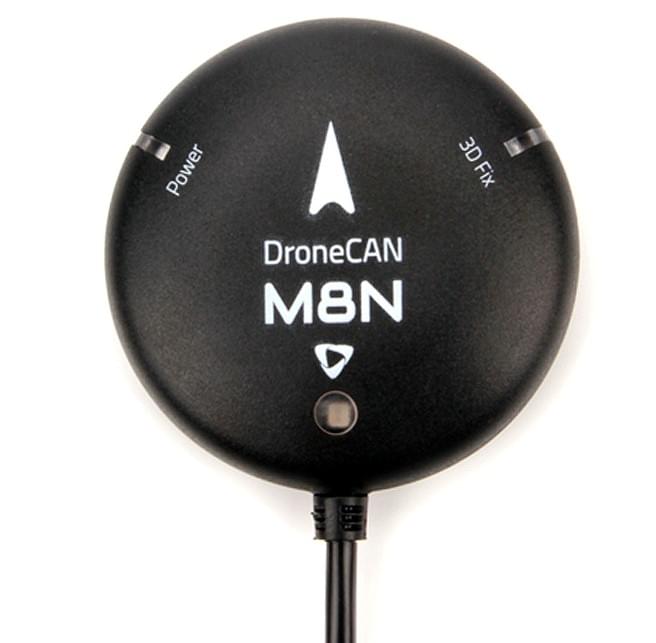
The Holybro DroneCAN GPS has an UBLOX M8N module, BMM150 compass, tri-colored LED indicator.
The GPS module uses the [DroneCAN](index.md) protocol for communication.
DroneCAN connections are more resistant to electromagnetic interference compared to serial connection, making it more reliable.
In addition, using DroneCAN means that the GPS and compass do not occupy any flight controller serial ports (different/additional CAN devices can be connected to the same CAN bus via a CAN splitter board).
 ## Where to Buy
Order this module from:
- [Holybro](https://holybro.com/products/dronecan-m8n-gps)
## Hardware Specifications
| | DroneCAN M8N |
| ------------------------- | -------------------------------------------------------------------------------------------------------------------------------------------------- |
| GNSS Receiver | Ublox NEO M8N |
| Number of Concurrent GNSS | 2 (Default GPS + GLONASS) |
| Processor | STM32G4 (170MHz, 512K FLASH) |
| Compass | BMM150 |
| Frequency Band |
## Where to Buy
Order this module from:
- [Holybro](https://holybro.com/products/dronecan-m8n-gps)
## Hardware Specifications
| | DroneCAN M8N |
| ------------------------- | -------------------------------------------------------------------------------------------------------------------------------------------------- |
| GNSS Receiver | Ublox NEO M8N |
| Number of Concurrent GNSS | 2 (Default GPS + GLONASS) |
| Processor | STM32G4 (170MHz, 512K FLASH) |
| Compass | BMM150 |
| Frequency Band | GPS: L1C/A
GLONASS: L10F
Beidou: B1I
Galileo: E1B/C
|
| GNSS Augmentation System | SBAS: WAAS, EGNOS, MSAS, QZSS |
| Navigation Update | 5Hz Default(10Hz MAX) |
| Navigation sensitivity | –167 dBm |
| Cold starts | \~ 26s |
| Accuracy | 2.5m |
| Speed Accuracy | 0.05 m/s |
| Max # of Satellites | 22+ |
| Default CAN BUS data rate | 1MHz |
| Communication Protocol | DroneCAN @ 1 Mbit/s |
| Supports Autopilot FW | PX4, Ardupilot |
| Port Type | GHR-04V-S |
| Antenna | 25 x 25 x 4 mm ceramic patch antenna |
| Voltage | 4.7-5.2V |
| Power consumption | Less than 200mA @ 5V |
| Temperature | -40\~80C |
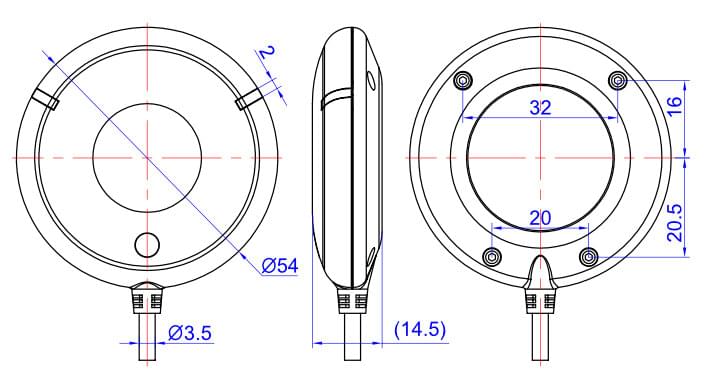
| Size | Diameter: 54mm
Thickness: 14.5mm
|
| Weight | 36g |
| Cable Length | 26cm |
| Other | - LNA MAX2659ELT+ RF Amplifier
- Rechargeable Farah capacitance
- Low noise 3.3V regulator
- 26cm cable included
|
## Hardware Setup
### Mounting
The recommended mounting orientation is with the arrow on the GPS pointing towards the **front of vehicle**.
The sensor can be mounted anywhere on the frame, but you will need to specify its position, relative to vehicle centre of gravity, during [PX4 configuration](#px4-configuration).
### Wiring
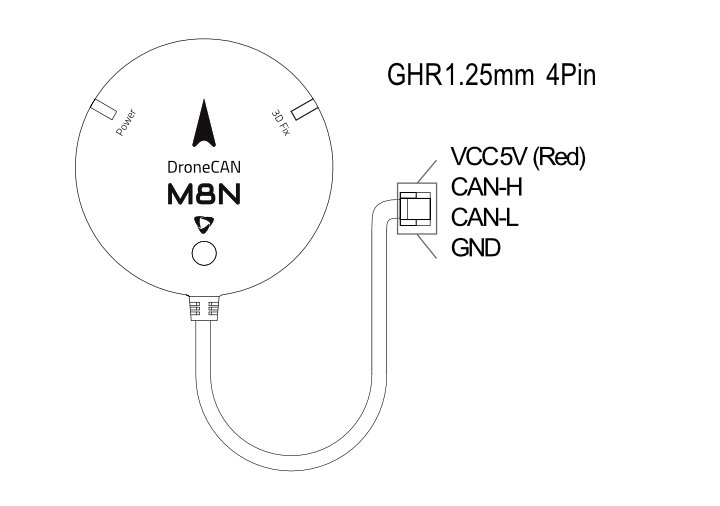
The Holybro DroneCAN GPS is connected to the CAN bus using a Pixhawk standard 4 pin JST GH cable.
For more information, refer to the [CAN Wiring](../can/index.md#wiring) instructions.
### Pinout
### Dimensions
## PX4 Configuration
You need to set necessary [DroneCAN](index.md) parameters and define offsets if the sensor is not centred within the vehicle.
The required settings are outlined below.
::: info
The GPS will not boot if there is no SD card in the flight controller when powered on.
:::
### Enable DroneCAN
In order to use the ARK GPS board, connect it to the Pixhawk CAN bus and enable the DroneCAN driver by setting parameter [UAVCAN_ENABLE](../advanced_config/parameter_reference.md#UAVCAN_ENABLE) to `2` for dynamic node allocation (or `3` if using [DroneCAN ESCs](../dronecan/escs.md)).
The steps are:
- In _QGroundControl_ set the parameter [UAVCAN_ENABLE](../advanced_config/parameter_reference.md#UAVCAN_ENABLE) to `2` or `3` and reboot (see [Finding/Updating Parameters](../advanced_config/parameters.md)).
- Connect GPS CAN to the Pixhawk CAN.
Once enabled, the module will be detected on boot.
GPS data should arrive at 5Hz.
DroneCAN configuration in PX4 is explained in more detail in [DroneCAN > Enabling DroneCAN](../dronecan/index.md#enabling-dronecan).
### Sensor Position Configuration
If the sensor is not centred within the vehicle you will also need to define sensor offsets:
- Enable GPS yaw fusion by setting bit 3 of [EKF2_GPS_CTRL](../advanced_config/parameter_reference.md#EKF2_GPS_CTRL) to true.
- Enable [UAVCAN_SUB_GPS](../advanced_config/parameter_reference.md#UAVCAN_SUB_GPS), [UAVCAN_SUB_MAG](../advanced_config/parameter_reference.md#UAVCAN_SUB_MAG), and [UAVCAN_SUB_BARO](../advanced_config/parameter_reference.md#UAVCAN_SUB_BARO).
- Set [CANNODE_TERM](../advanced_config/parameter_reference.md#CANNODE_TERM) to `1` if this is that last node on the CAN bus.
- The parameters [SENS_GPS0_OFFX](../advanced_config/parameter_reference.md#SENS_GPS0_OFFX), [SENS_GPS0_OFFY](../advanced_config/parameter_reference.md#SENS_GPS0_OFFY) and [SENS_GPS0_OFFZ](../advanced_config/parameter_reference.md#SENS_GPS0_OFFZ) can be set to account for the offset of the ARK GPS from the vehicles centre of gravity.